Building Apps
A dashboard over a Pond's output usually runs somewhere else, with its own server, its own deployment and a key to the Catchment, and nothing in the pipeline knows it depends on reports. An App is a Pond that serves a web app instead of running Ripples. You deploy it to the Catchment like any other Pond, it declares the Ponds it reads as Sources, and the Catchment starts it when someone opens it and stops it when nobody is using it.
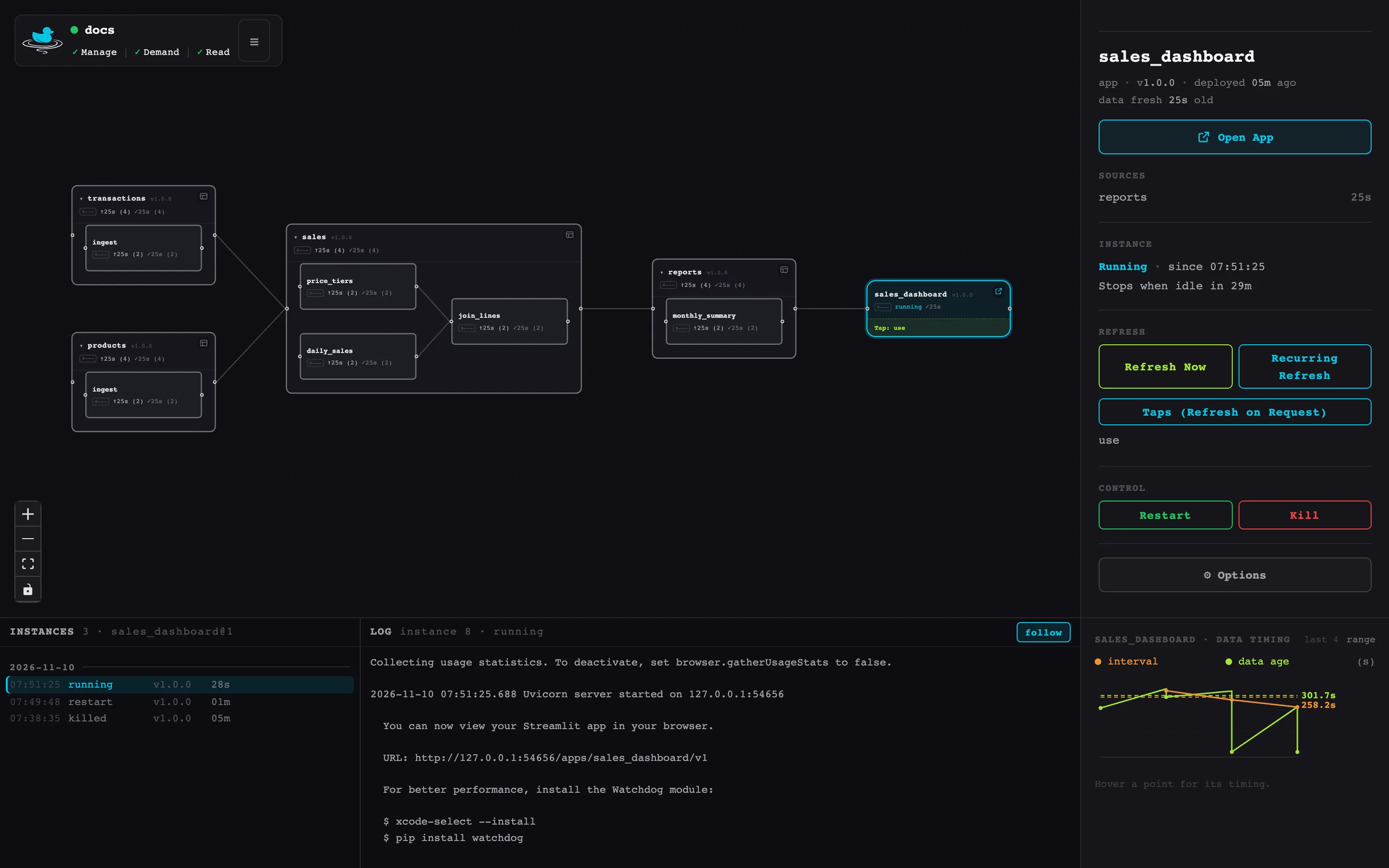
Because its Sources are declared, an App takes part in the pipeline as an Outlet: a Refresh on it reaches everything it reads, the web UI draws it at the end of the graph, and its version pins protect it from incompatible changes upstream.
If your app already runs elsewhere and only needs to query a Pond, give it a Tap instead (see Refreshing on Use with Taps).
A first App
This App shows the demo's reports.monthly_summary with Streamlit. It's a directory with a pond.toml, the app's code, and the Python packages it needs:
sales_dashboard/
├── app.py
├── pond.toml
├── pyproject.toml
└── uv.lock
type = "app" makes the Pond an App, and the [app] section says how to start it:
[pond]
name = "sales_dashboard"
version = "1.0.0"
type = "app"
memory = "500MB"

[sources]
reports = "1.0.0"

[app]
command = 'streamlit run app.py --server.port $PORT --server.address 127.0.0.1 --server.baseUrlPath "$DUCKSTRING_APP_PATH" --server.headless true'
strip_path = false
health = "/_stcore/health"
state = "none"
- The command must listen on
127.0.0.1at$PORT. The Catchment picks a free port each time it starts the App, so there's no port to choose or reserve. $DUCKSTRING_APP_PATHis the path the App is served under, here/apps/sales_dashboard/v1. Streamlit needs it as its base URL path, and withstrip_path = falserequests reach it with that path still on (see Addresses and paths).healthis a path that answers once the App is ready to serve.memoryis what the whole App needs, DuckDB included, set aside while it runs (see Memory), andstate = "none"says the App keeps no files on the Catchment (see State).--server.headless truestops Streamlit asking for an email address on its first run.
app.py reads reports through the App's handle:
import streamlit as st
from duckstring import app

pond = app.pond()

st.title("Monthly sales")
as_of = pond.freshness()["freshness"]
if as_of:
    st.caption(f"Data as of {as_of:%Y-%m-%d %H:%M} UTC")
summary = pond.read_table("reports.monthly_summary")
st.dataframe(summary.order("year, month, category").df(), hide_index=True)
app.pond() is a read-only handle on the App's Sources. read_table returns a DuckDB relation over the newest data reports has published, and freshness() says how current that is.
The App gets its own environment like any Pond with Python dependencies:
cd sales_dashboard
uv init --bare
uv add streamlit duckstring
Trying it locally
Copy the Source's tables from the Catchment into puddles/, then serve the App against them:
duckstring pond hydrate --from-catchment
duckstring pond run
pond run in an App's directory serves it at http://127.0.0.1:8000/ (--port changes the port) in the App's .venv, with an empty base path. freshness() has nothing to report locally, so the caption doesn't show. Testing with Puddles covers Puddles defined in code, for Sources you'd rather not copy.
Deploying
duckstring pond deploy
Open http://127.0.0.1:7474/apps/sales_dashboard/ on a local Catchment. The first request starts the App and waits until health answers, about two seconds here.
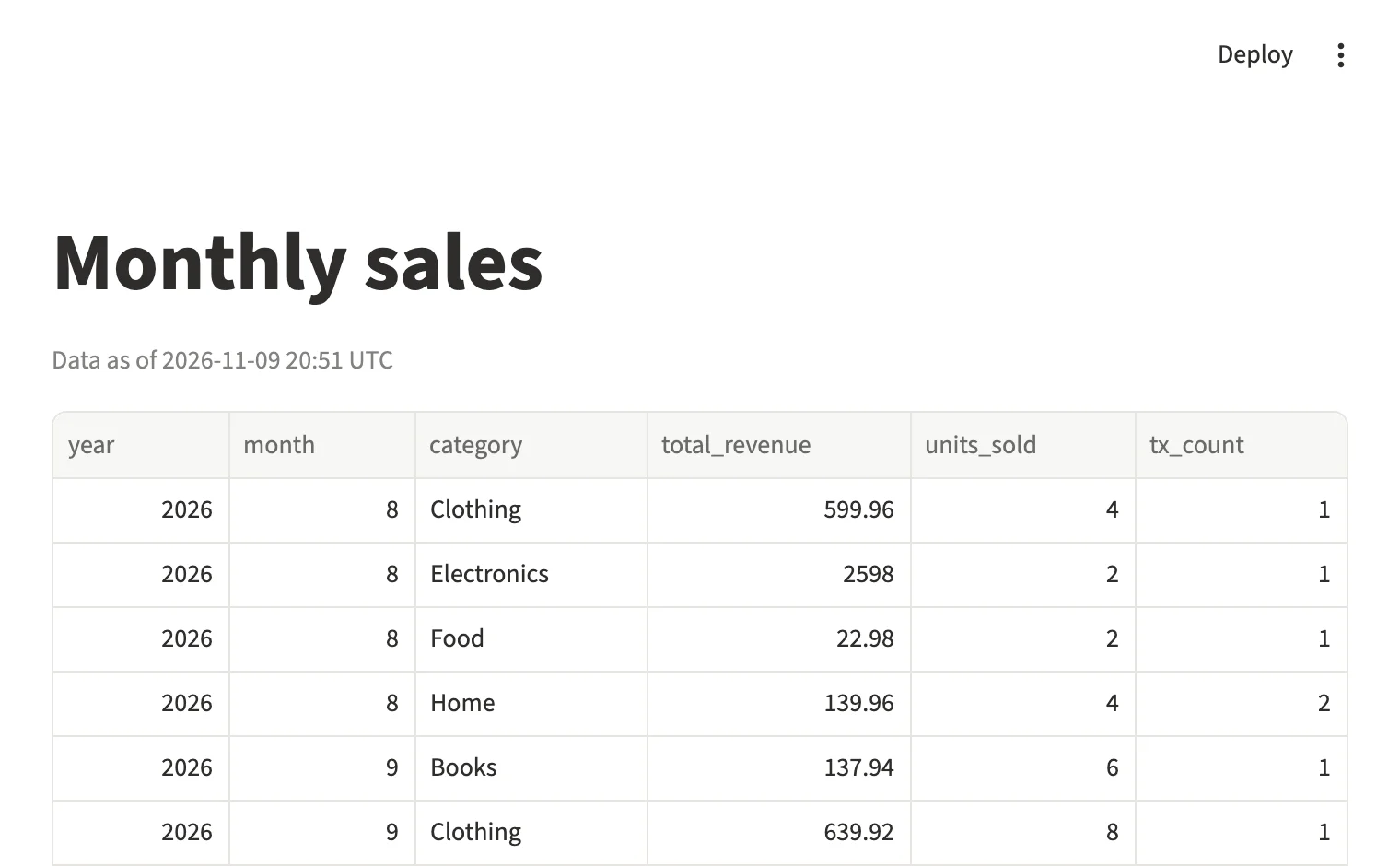
/apps/sales_dashboard/v1/.In the web UI the App is a rounder box at the end of the pipeline, with an Open button. Selecting it shows its Sources and their ages, its running instance, and its output in the bottom panel:
To change the App, edit it and deploy again. An App can be redeployed at the version it's running: the Catchment stops the running process, and the next request starts the new code. A new major version runs beside the old one, at its own address.
Addresses and paths
Every App is served on the Catchment's own port, at /apps/{name}/v{major}/. /apps/{name}/ redirects to the major version the Pond's bare name refers to, which is the first deployed until you run duckstring pond promote (see Queries by name). Use the versioned address in links that should never move.
A web framework served below a path has to know that path, so the links and assets it generates point at the right place. strip_path decides what the App sees:
strip_path | A request for /apps/sales_api/v1/summary reaches the App as | Suits |
|---|---|---|
true (default) | /summary, with X-Forwarded-Prefix: /apps/sales_api/v1 | Servers given a root path, such as uvicorn --root-path, and WSGI apps |
false | /apps/sales_api/v1/summary | Frameworks configured with the full path, such as Streamlit's --server.baseUrlPath |
Put "$DUCKSTRING_APP_PATH" in double quotes in the command. Under pond run it's empty, and an unquoted empty variable disappears from the command line along with the option's value: uvicorn stops with "Option '--root-path' requires an argument", and Streamlit takes the next option as the path. Writing the whole command as a TOML literal string, in single quotes, keeps the double quotes intact.
WebSockets and streamed responses are forwarded, which Streamlit and server-sent events rely on. Files in a static directory are served by the Catchment without reaching the process, and an App with static and no command has no process at all, which suits a frontend built to plain files.
Recipes
Each of these ran through a Catchment as shown. The [pond] and [sources] sections are as in the first App.
FastAPI
Uvicorn takes the base path as --root-path, so the default strip_path fits:
[app]
command = 'uvicorn main:api --port $PORT --root-path "$DUCKSTRING_APP_PATH"'
health = "/healthz"
state = "none"
from duckstring import app
from fastapi import FastAPI

pond = app.pond()
api = FastAPI()


@api.get("/healthz")
def healthz():
    return {"ok": True}


@api.get("/summary")
def summary(year: int):
    pond.read_table("reports.monthly_summary")  # registers the view monthly_summary
    result = pond.con.execute(
        "SELECT month, category, total_revenue FROM monthly_summary WHERE year = ? ORDER BY month, category",
        [year],
    )
    columns = [c[0] for c in result.description]
    return [dict(zip(columns, row)) for row in result.fetchall()]
The FastAPI object is api because app is already Duckstring's module. Install with uv add fastapi uvicorn duckstring. FastAPI's interactive docs work at /apps/sales_api/v1/docs.
Dash
Dash is told the full path for the browser and the stripped one for its own routes, and runs under gunicorn:
[app]
command = "gunicorn app:server --bind 127.0.0.1:$PORT --workers 2"
state = "none"
import os

from dash import Dash, Input, Output, dash_table, dcc, html
from duckstring import app

pond = app.pond()
dash_app = Dash(__name__, requests_pathname_prefix=os.environ["DUCKSTRING_APP_PATH"] + "/",
                routes_pathname_prefix="/")
server = dash_app.server


def layout():
    pond.read_table("reports.monthly_summary")
    categories = pond.con.execute("SELECT DISTINCT category FROM monthly_summary ORDER BY 1").fetchall()
    return html.Div([
        html.H1("Monthly sales"),
        dcc.Dropdown([c for (c,) in categories], id="category"),
        dash_table.DataTable(id="table"),
    ])


dash_app.layout = layout  # a function, so each page load lists the current categories


@dash_app.callback(Output("table", "data"), Output("table", "columns"), Input("category", "value"))
def update(category):
    pond.read_table("reports.monthly_summary")
    df = pond.con.execute(
        "SELECT * FROM monthly_summary WHERE ? IS NULL OR category = ? ORDER BY year, month",
        [category, category],
    ).df()
    return df.to_dict("records"), [{"name": c, "id": c} for c in df.columns]
Install with uv add dash gunicorn pandas duckstring. Gunicorn runs two worker processes here, each with its own handle; see Memory for what that means for [pond] memory.
Flask
Flask follows X-Forwarded-Prefix once Werkzeug's ProxyFix is applied, so url_for builds links under the base path:
[app]
command = "gunicorn app:server --bind 127.0.0.1:$PORT"
state = "none"
from duckstring import app
from flask import Flask, url_for
from werkzeug.middleware.proxy_fix import ProxyFix

pond = app.pond()
server = Flask(__name__)
server.wsgi_app = ProxyFix(server.wsgi_app, x_prefix=1)


@server.get("/")
def index():
    rows = pond.read_table("reports.monthly_summary").count("*").fetchall()
    return f'{rows[0][0]} rows. <a href="{url_for("about")}">About</a>'


@server.get("/about")
def about():
    return "Served by Duckstring"
Install with uv add flask gunicorn duckstring.
Reading data
The handle reads only the App's Sources, so always name the Source: pond.read_table("reports.monthly_summary"). Each read returns the newest data the Source has published at that moment, and the version a request may read stays available until its response has been sent, even if the Source publishes again meanwhile. Reads outside a request, such as a cache filled at startup or a background thread, should go inside with pond.hold():, which keeps what each Source has published now until the block ends.
Web servers handle requests on several threads, so each thread gets its own DuckDB cursor as pond.con. read_table registers the table as a view on the calling thread's cursor, so query the view on the same thread, as the recipes do.
An App can't publish tables or Objects. If it collects data that a pipeline should use, serve that over HTTP from the App and read it from an Inlet. App Handle lists what the handle offers.
Keeping it fresh
An App's data is as fresh as its Sources. With nothing scheduled, it shows whatever they last published. A recurring Refresh on the App reaches everything it reads, as on any Outlet:
duckstring refresh add sales_dashboard --every 1h
To refresh only while people use the App, add a Tap:
duckstring refresh tap add sales_dashboard --name use --fresh-within 1h
A Tap on an App has no key, because requests already come through the Catchment. Each request that reaches the App counts as a query, as does each message from the browser on a WebSocket (at most once a second); requests for static files don't. When the data is older than --fresh-within, a query sends a Refresh, and the page is answered at once from what's published while the Refresh lands for the requests after it. Frameworks fetch their own scripts and styles through the App, so the query count in duckstring refresh tap ls runs well above the number of page views. Choosing how fresh has more on the policy.
Access
An open Catchment, or one behind a hosting platform's sign-in, lets every request through to its Apps. With API keys, a request needs a key at any level, read included: a program sends it as a bearer token, and a browser gets a small sign-in page once, which keeps the key in a cookie for /apps/. The web UI's Open button signs the new tab in with the key the UI already holds. The key is removed before the request reaches the App.
Anything finer, such as single sign-on or a list of who may see a dashboard, is up to the App itself.
Memory
On the Catchment's own machine, Pond Runs share a memory budget as memory slots, four by default. While an App's process runs, it sets its [pond] memory aside from that budget, and the slots divide what's left. Set memory to what the whole App needs: the web framework, anything it holds in Python such as data frames, and DuckDB, which the App's handle limits to that amount. The memory comes back when the process stops.
An App that doesn't set memory sets nothing aside, and its DuckDB is limited to 256 MB. That suits a small App, since the budget already leaves room for the Catchment and the operating system. Set memory for an App that holds much data or runs larger queries.
Running Apps may set aside at most half the budget, so Pond Runs always keep the other half. A start that would go past that gets a 503 saying the App's memory doesn't fit.
DuckDB's limit applies in each process. With gunicorn's --workers 2, each worker has its own DuckDB, and together they may use twice memory. To keep within it, lower each worker's limit when it starts, for example with pond.con.execute("SET memory_limit = '400MB'").
State
state = "local", the default, gives the App a directory at $DUCKSTRING_APP_STATE for a database or files. It survives restarts and redeploys, and is deleted only when the App's major version is removed. Use state = "none" for an App that keeps nothing, or keeps its state elsewhere, such as in a database of its own.
catchment download and the state backup copy an App's state only through [app] download, a command that writes a consistent copy of it; see [app].
Starting, stopping and failures
The first request starts the App's process, and that request waits until the App is ready: health answers with a 2xx, or without health, the port accepts connections. The process stops after idle_timeout with no request in flight (default 30m; "0" keeps it running), and also on a redeploy, a Kill, removal, and when the Catchment shuts down. An open WebSocket or a response still streaming counts as in flight.
A process that exits on its own, or isn't ready within 60 seconds, counts as a failure. The App is started again on the next request up to immediate_retries times in a row, which is 0 unless pond.toml sets it. After that the App fails: an alert fires as for any failed Pond, and requests get a 503 until you bring it back with duckstring control wake, duckstring app restart or a redeploy.
To see what happened, duckstring app lists the App's instances with why each stopped, and prints their output:
duckstring app instances sales_dashboard
duckstring app logs sales_dashboard --follow
Current limits
An App runs on the Catchment's own machine, as one process (with its own workers, if the server has them). Cloud compute and running several instances aren't currently supported for Apps. The command runs in a Python environment, so the App's server must be something Python can install; anything that builds to static files can be served with static.