Records and Media
An App that only shows data needs nothing but its Sources. One that collects data, such as ratings, comments or uploaded files, needs somewhere to keep it that outlives the App's process, that several instances can share, and that a pipeline can read. The App's private state directory (see Building Apps) is one machine's, and nothing else can see it.
Records and Media are data the Catchment keeps for an App. Records are the App's tables, in a PostgreSQL database. Media are its files, in a folder on the Catchment's disk or under an object-store prefix. Each major version of the App has its own Records and Media, which the App writes, Ponds read, and the web UI shows.
This page follows a feedback App where people rate each month of the demo's reports.monthly_summary and attach files, and a feedback_summary Pond that reads the ratings back into the pipeline.
Turning them on
An App asks for them in its [app] section:
[pond]
name = "feedback"
version = "1.0.0"
type = "app"

[app]
command = 'uvicorn main:api --port $PORT --root-path "$DUCKSTRING_APP_PATH"'
health = "/healthz"
state = "none"
records = true
media = true
When the App first starts, the Catchment creates its Records and Media. For Records that's a PostgreSQL schema and a sign-in role, both named {name}_v{major}, here feedback_v1. An App with Records therefore needs a name of lower-case letters, digits and underscores, starting with a letter or underscore, of at most 48 characters. Media is a folder for the same line.
By default the Catchment runs its own PostgreSQL for Records, started the first time an App needs it. PostgreSQL has to be installed on the Catchment's machine:
duckstring install postgres
This installs it from the PostgreSQL project's apt or yum repository, or from Homebrew on macOS, and prints the steps before running them. Duckstring's container image already includes it. Running Records and Media covers using a PostgreSQL you already run instead.
Writing Records
The App connects with its own role, which can create and change tables in its own schema:
from pathlib import PurePath

from duckstring import app
from fastapi import FastAPI, UploadFile
from pydantic import BaseModel

pool = app.records_pool(open=True)
media = app.media()

with pool.connection() as con:
    con.execute("""
        CREATE TABLE IF NOT EXISTS ratings (
            id         bigint GENERATED ALWAYS AS IDENTITY PRIMARY KEY,
            year       int NOT NULL,
            month      int NOT NULL,
            category   text NOT NULL,
            stars      int NOT NULL CHECK (stars BETWEEN 1 AND 5),
            comment    text,
            created_at timestamptz NOT NULL DEFAULT now()
        )
    """)

api = FastAPI()


class Rating(BaseModel):
    year: int
    month: int
    category: str
    stars: int
    comment: str | None = None


@api.get("/healthz")
def healthz():
    return {"ok": True}


@api.post("/ratings")
def add_rating(rating: Rating):
    with pool.connection() as con:
        row = con.execute(
            "INSERT INTO ratings (year, month, category, stars, comment) VALUES (%s, %s, %s, %s, %s) RETURNING id",
            (rating.year, rating.month, rating.category, rating.stars, rating.comment),
        ).fetchone()
    return {"id": row[0]}


@api.post("/ratings/{rating_id}/attachment")
async def attach(rating_id: int, file: UploadFile):
    path = f"attachments/{rating_id}/{PurePath(file.filename).name}"
    with media.open(path, "wb") as f:
        f.write(await file.read())
    return {"path": path}
uv add fastapi uvicorn python-multipart 'psycopg[binary]' psycopg_pool fsspec duckstring
app.records_pool() returns a psycopg connection pool sized to the connections one instance of the App may hold (see Connections). app.records() returns a single connection instead. The role's search path puts its own schema first, so ratings means feedback_v1.ratings.
The App also gets its Records as DUCKSTRING_RECORDS_URL, a standard PostgreSQL connection URL, so any driver or language can use it. app.records_url() returns the same URL, for SQLAlchemy (as postgresql+psycopg://) or asyncpg.
Every App can read every other App's Records as {name}_v{major}.{table}, but it can write only its own.
Keeping files in Media
app.media() is an fsspec filesystem rooted at the App's Media, with relative paths, as in the attach endpoint above. It works the same wherever the Catchment keeps Media; for an object store, add its package (s3fs, gcsfs or adlfs). When Media is on the Catchment's own disk, app.media_path() returns the folder as a local path, for libraries that want one. Other languages get the location as DUCKSTRING_MEDIA_URL.
Taking only the last part of an uploaded file's name, as PurePath(file.filename).name does, keeps a name like ../../x from writing outside the folder the App meant.
Seeing the data
In the web UI, an App with Records or Media has a table icon beside its Open button. It opens the App's data in the Catalog, which lists every App's Records and Media under App data:
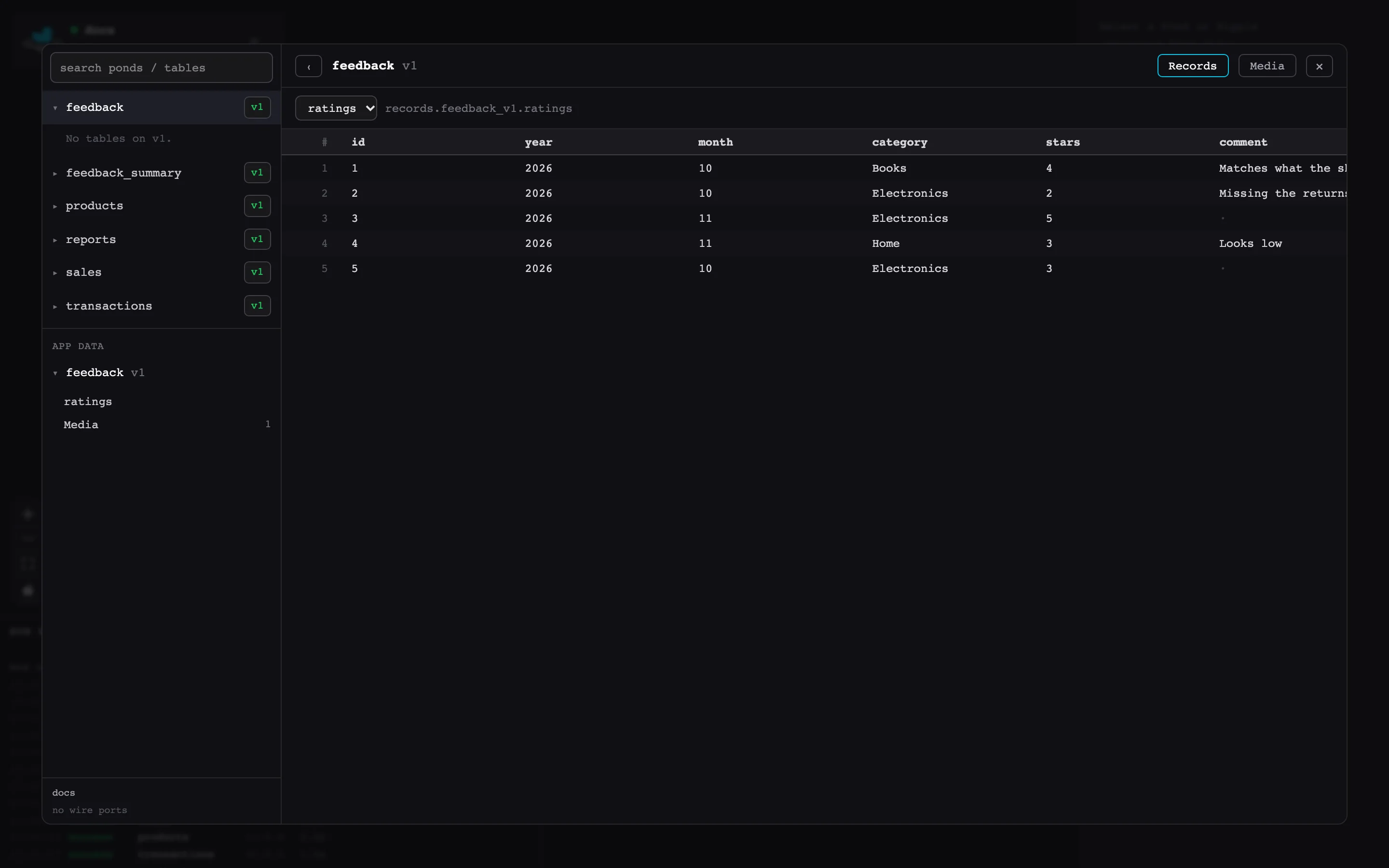
feedback App's Records in the Catalog.Records are read-only here. Media can be downloaded with read access, and uploaded and deleted with Manage access.
Records are also part of the catalog SQL reads, as the catalog records:
duckstring query "SELECT category, avg(stars) FROM records.feedback_v1.ratings GROUP BY category"
Reading them in a Pond
A Pond reads an App's Records as a relation with pond.read_records, naming the App's major version. This one adds each month's ratings to reports.monthly_summary:
[pond]
name = "feedback_summary"
version = "1.0.0"
type = "outlet"
external = ["app:feedback@1"]

[sources]
reports = "1.0.0"
from duckstring import ripple


@ripple(always_run=True)
def rated_months(pond):
    stars = pond.read_records("feedback@1.ratings").aggregate(
        "year, month, category, round(avg(stars), 2) AS avg_stars, count(*) AS ratings",
        "year, month, category",
    )
    summary = pond.read_table("reports.monthly_summary")
    pond.write_table("rated_months", summary.join(stars, "year, month, category", how="left"))
The App isn't a Source, so nothing tells the engine when its Records change. A Pond with Sources would skip a Run when its Sources haven't changed, so the Ripple reading Records sets always_run=True. An Inlet reading them needs nothing extra, since an Inlet always runs when asked.
external draws the App's data on the canvas, feeding the Pond. It's for the picture only and declares nothing to the engine. An app: entry opens that line's data when clicked; any other text, such as "GDELT events", is drawn as a plain label.
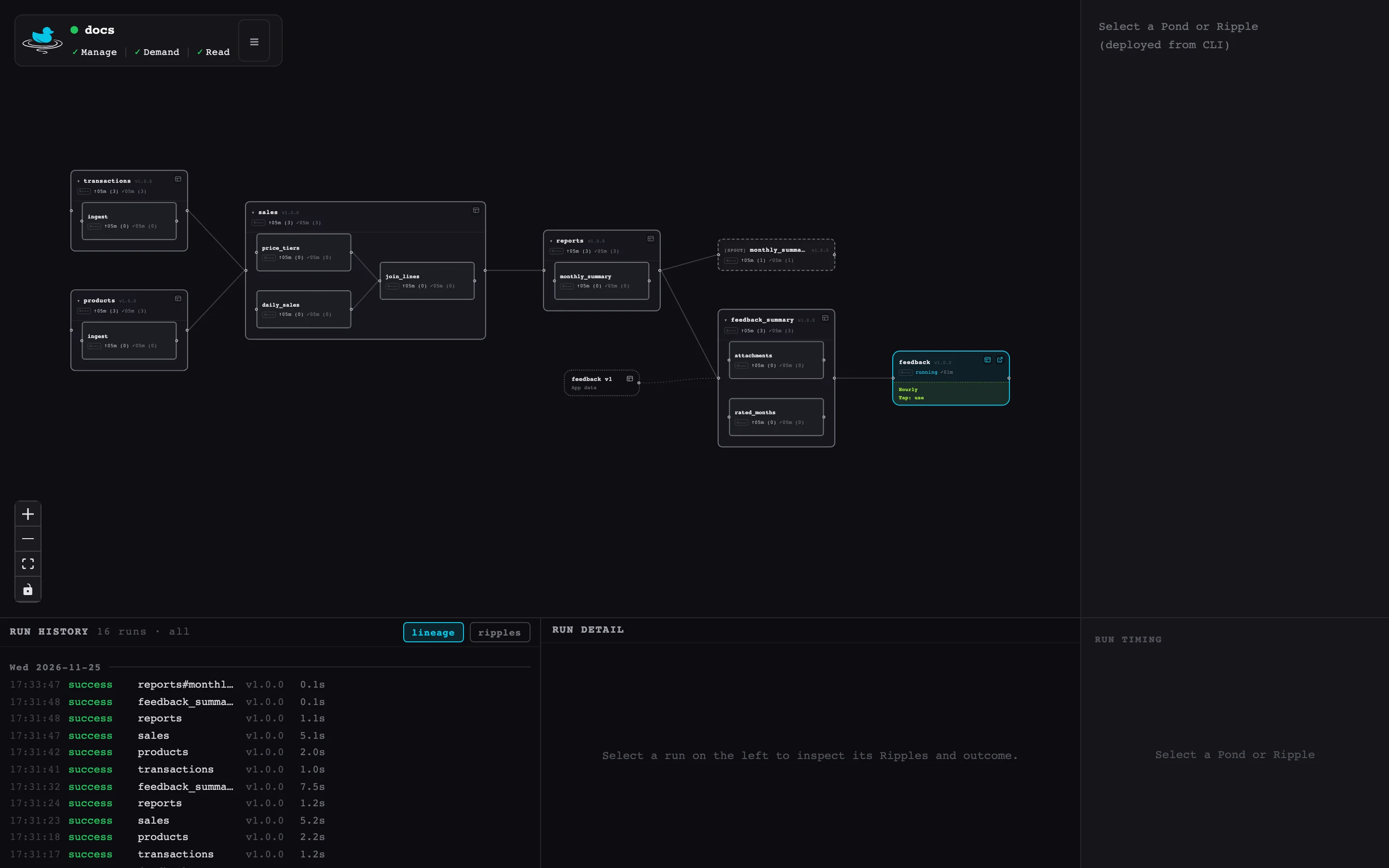
feedback_summary reading the App's data, drawn by external.To keep a history of what the App changed, merge_table the relation with its key, and readers downstream get its changes as a Trickle.
Media is read with pond.media, which lists a line's files, or a folder of them, as the Ripple's Run sees them:
@ripple(always_run=True)
def attachments(pond):
    files = pond.media("feedback@1", "attachments").files()
    listing = pond.con.sql(
        "SELECT unnest($files::STRUCT(path VARCHAR, size BIGINT, modified VARCHAR)[], recursive := true)",
        params={"files": files},
    )
    pond.write_table("attachments", listing.select("split_part(path, '/', 2)::BIGINT AS rating_id, path, size"))
added() lists only the files that are new or changed since the Ripple's previous Run, and removed() the ones that went, so a Ripple can process each upload once. open(path) reads a file, and path(path) gives a local path, copied from an object store when Media is in one.
Back to the App
The App can read what the Pond made by declaring it as a Source:
[sources]
feedback_summary = "1.0.0"
pond = app.pond()


@api.get("/months")
def months():
    pond.read_table("feedback_summary.rated_months")
    result = pond.con.execute(
        "SELECT year, month, category, total_revenue, avg_stars, ratings FROM rated_months ORDER BY year, month, category"
    )
    columns = [c[0] for c in result.description]
    return [dict(zip(columns, row)) for row in result.fetchall()]
A Tap on the App then refreshes the summary while people use it, so new ratings reach the page within the Tap's bound:
duckstring refresh tap add feedback --name use --fresh-within 5m
Delivering Pond output into Records
Apps read Pond output through their handle, which suits analytical queries. For quick lookups from many requests, a Spout can deliver a Pond's table into Records instead, where every App reads it with its PostgreSQL driver:
duckstring spout add reports --to records: --table monthly_summary
The table lands in a schema named after the Pond's line, here reports_v1.monthly_summary, and is kept up to date as reports publishes. The Pond's name has to follow the same rule as an App with Records. See Delivering with Spouts.
Trying it locally
duckstring pond run in the App's directory gives it a PostgreSQL of its own under puddles/app/records/, which needs PostgreSQL installed, and Media under puddles/app/media/. Both are kept between runs.
A Pond reading Records or Media under pond run reads snapshots from its Puddles instead: a Records table at puddles/records/{name}_v{major}/{table}.parquet, and Media under puddles/media/{name}/m{major}/. To copy a table from a Catchment:
duckstring query "SELECT * FROM records.feedback_v1.ratings" --parquet puddles/records/feedback_v1/ratings.parquet
New major versions
Records and Media hold original data that nothing can recompute, and two live major versions would take writes in two places. So an App with Records or Media has one live major version at a time, and a new major takes over the old one's data.
A new major version deployed beside the live one is a trial. Its first start copies the live version's Records and Media and runs the App's migrate command over the copy. Most migrations are a few ALTER statements:
[app]
# ...
records = true
media = true
migrate = "python migrate.py"
from duckstring import app

with app.records() as con:
    con.execute("ALTER TABLE ratings ADD COLUMN reviewer text")
The command runs in the App's directory and environment with its own Records and Media, and gets DUCKSTRING_PREVIOUS_MAJOR, DUCKSTRING_PREVIOUS_MEDIA_URL, and DUCKSTRING_PREVIOUS_STATE when the previous version kept a private state directory, so a migration can also move a SQLite file into Records.
Only Manage access can open the trial, at /apps/feedback/v2/. Anything written there is replaced by the next migration, and duckstring app migrate feedback --major 2 runs it again whenever you like.
duckstring pond promote feedback --major 2 makes the trial live:
- The live version's instances stop, and the App answers
503withRetry-After: 5until the switch. - The migration runs again from the live version's current data.
- Version 2 becomes live and version 1 is retired: its Records are frozen read-only, and its address redirects to version 2.
If the migration fails, version 1 stays live as it was and the error is reported.
A Pond names the major version it reads, so feedback_summary keeps reading the frozen feedback@1 until you change it to feedback@2. Update readers when you promote.
Data outlives the App: pond remove keeps a line's Records and Media. duckstring app purge feedback@1 deletes them for good. It refuses the live line of a deployed App.
Running Records and Media
Where they live
The Catchment's own PostgreSQL suits most Catchments. To use one you already run, such as Amazon RDS or Cloud SQL, point Records at it before any App has Records:
duckstring catchment records --use 'postgres://duckstring:${secret:RECORDS_PASSWORD}@db.internal/duckstring'
Its user needs CREATEROLE and CREATEDB, since the Catchment makes a role and schema for each App line. Credentials are written as ${secret:NAME} or ${env:NAME} references, as for Spouts.
Media goes on the Catchment's disk unless you name an object store first, with credentials as for a data root:
duckstring catchment media --use s3://acme-apps/media
Once an App line holds data, these settings are fixed. A move copies everything to a new place.
Memory and connections
The Catchment's PostgreSQL sets 512 MB aside while it runs, as an App sets aside its memory, and Pond Runs share what's left. Change it with --memory 1GB. Its connection limit follows: one connection per 10 MB, from 50 up to 1000. Each App line's role is limited to its share (see Connections).
Reaching it from other machines
The Catchment's PostgreSQL listens on 127.0.0.1. When something on another machine needs Records, such as an App instance or a Pond on cloud compute, or a BI tool, give it an address to listen on:
duckstring catchment records --listen 0.0.0.0 --host records.internal
Other machines can then connect only over TLS. The Catchment makes a self-signed certificate for the --host name unless you give one with --tls-cert and --tls-key, and duckstring catchment records shows the certificate's SHA-256 fingerprint. Instances and Ducks the Catchment starts verify it. --reader-url prints a read-only connection URL for a BI tool.
Hosts that serve the Catchment at one HTTP address, such as Posit Connect or Databricks Apps, can't expose a PostgreSQL port. There, use an external PostgreSQL if anything off the Catchment's machine needs Records.
Moving them
duckstring catchment records move copies every App's Records to another PostgreSQL:
duckstring catchment records move 'postgres://duckstring:${secret:RECORDS_PASSWORD}@db.internal/duckstring'
Apps with Records answer 503, and Spouts into Records wait, while the database is copied. Row counts are compared, the Catchment switches over, and the old database is deleted. A failure before the switch leaves the old one as it was. Moving to managed with --postgres-version 19 is also how the Catchment's own PostgreSQL moves to a new major version, after duckstring install postgres --postgres-version 19.
duckstring catchment media move s3://acme-apps/media copies Media while Apps run, stops Apps with Media while it copies what changed, compares the listings, switches and deletes the old files.
Backups
catchment download and the state backup include Records as a pg_dump, which a fresh Catchment restores, and Media; the state backup includes Media up to 256 MB.