Scaling Apps
An App starts as one process on the Catchment's machine, which suits a dashboard a team opens a few times a day. An App that many people use at once, or that does heavy work per request, can outgrow one process, and a Catchment kept on a small machine may have no room for it at all. Such an App can run as several instances, each a copy of its process. The Catchment starts more as load grows and stops them as it falls, on its own machine or on the same cloud compute that runs Ducks.
Several instances
instances is the most the App may run at once:
[app]
command = 'uvicorn main:api --port $PORT --root-path "$DUCKSTRING_APP_PATH"'
health = "/healthz"
state = "none"
records = true
instances = 3
concurrency = 2
Instances share nothing on disk, so an App with more than one needs state = "none", and keeps what it collects in Records and Media, which every instance reaches.
concurrency is the number of requests one instance handles well at once, counting a WebSocket that carried a message in the last 5 seconds as a request. It's 4 by default; set it to what one instance handles, given its server's workers and threads. The Catchment routes and scales by it.
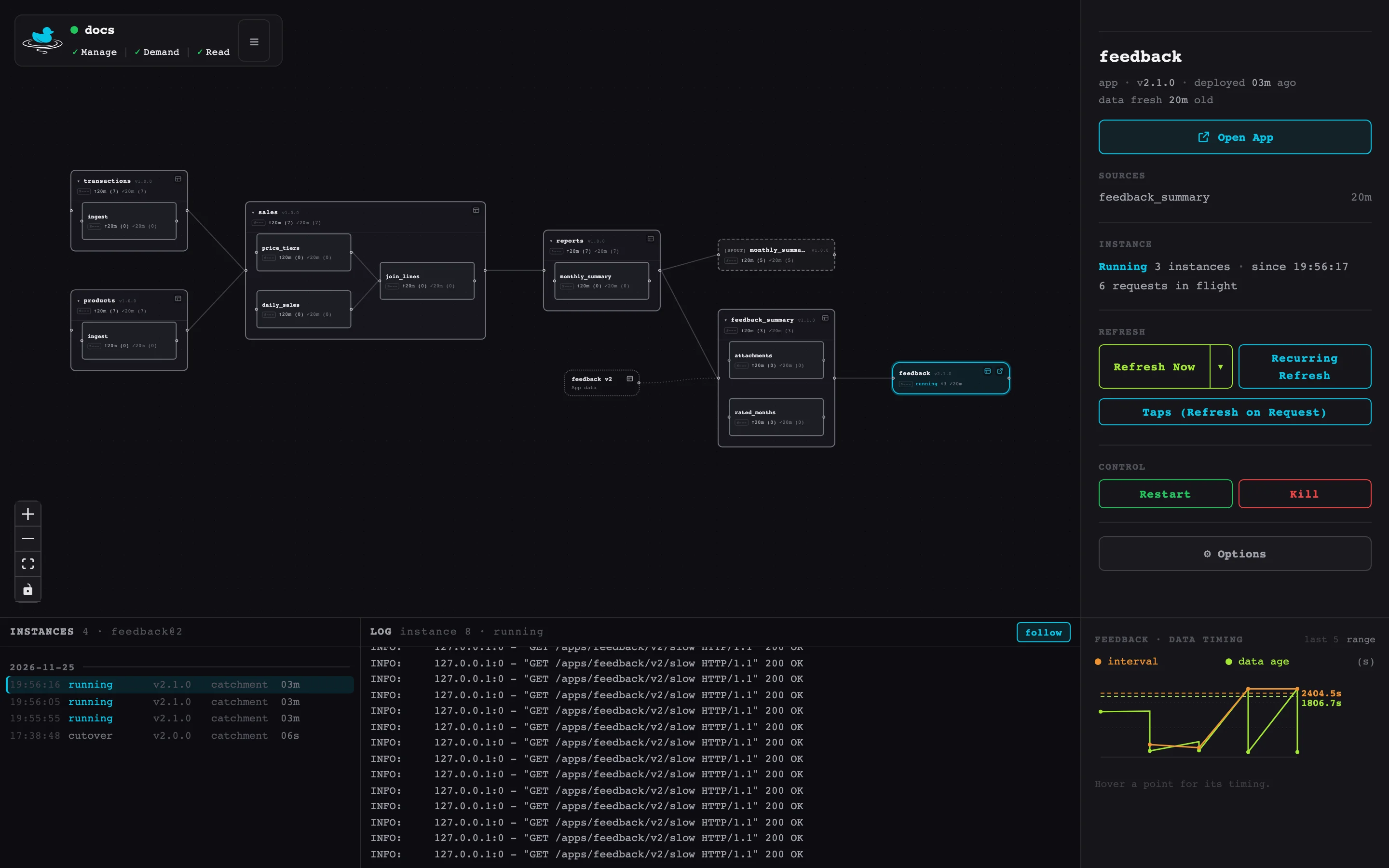
feedback App grown to three instances under load.How instances start and stop
The first request starts one instance, as for any App. After that:
- Routing. A new visitor goes to the busiest instance that's still under
concurrency, so work packs onto as few instances as possible and the rest can go idle. A browser keeps its instance through a cookie, which suits Apps that hold a session in memory, such as Streamlit. - Growing. When active work per instance averages 70% of
concurrencyover 10 seconds, one more instance starts, up toinstances. CPU at 70% of an instance's cores, memory at 80% of its limit, and the load the App reports at 0.7 count too. Each further instance waits its own 10 seconds. - Shrinking. An instance with no requests and no open WebSockets stops after the App's
idle_timeout.min_instanceskeeps that many running regardless, at the cost of the memory or machines they hold. - Stopping. An instance that's stopping takes no new visitors and finishes the requests it has. Its process then gets
SIGTERM, andSIGKILLafterstop_grace(10 seconds by default).
The thresholds are in [app.scale]:
[app.scale]
requests = 0.7   # active work per instance, as a share of concurrency
cpu = 0.7
memory = 0.8
after = "10s"
On the Catchment's machine, each instance sets aside the App's [pond] memory (see Memory), and its memory share is measured against that. Without memory, only the other measures count.
Instances on other compute
An App runs elsewhere when its pond.toml names compute, as a Pond does:
[pond]
name = "feedback"
version = "2.0.0"
type = "app"
duck = "M"
duck takes a built-in size (S, M, L, XL), a pool, or dedicated, and duckstring duck set changes it on the Catchment. It needs cloud compute set up, as in Cloud Compute on AWS, Azure or Google Cloud. Without it, the App stays on the Catchment's machine.
Where each instance starts depends on min_instances:
min_instances | The first request | Growth |
|---|---|---|
0 (default) | Starts an instance on the Catchment's machine, ready in seconds | On the App's compute |
1 or more | Waits for an instance on the App's compute, which is kept running | On the App's compute |
With 0, a quiet App lives on the Catchment, and a machine starts only under load, taking about a minute to boot and install the App. Requests go to instances on other compute first, so the Catchment's instance empties and stops when it can. With 1 or more, the App never runs on the Catchment's machine.
An instance elsewhere reads what it needs directly: its Sources' published data from the data root, Records from PostgreSQL, and Media from object storage. Only requests, its output and control messages pass through the Catchment, over a connection the instance opens, so worker machines need no inbound rules. It needs:
state = "none".- Records it can reach: an external PostgreSQL, or the Catchment's own listening on an address the compute reaches (see Reaching it from other machines), to which it connects over TLS and checks the certificate.
- Media in object storage (see Where they live).
Without them, a start elsewhere answers 503 naming what to change. An instance elsewhere has 15 minutes to become ready (DUCKSTRING_APP_REMOTE_START_TIMEOUT).
Instances elsewhere outlive a Catchment restart: when they reconnect, the new Catchment process takes them over. One that loses its Catchment for 5 minutes stops. When the Catchment shuts down cleanly, it stops them. On Cloud Run and Container Apps, which end a job after 7 days, an instance is replaced an hour before.
Connections
An instance of an App with Records may hold connections PostgreSQL connections, concurrency by default, and app.records_pool() sizes its pool to that. Each App line's role is limited to instances × connections + 2, so one busy App can't take every connection from the others.
The Catchment's own PostgreSQL allows one connection per 10 MB of its memory, from 50 to 1000. An App doesn't grow past what's left, after 10 kept for Ponds, Spouts and the Catchment. To allow more, give PostgreSQL more memory with duckstring catchment records --memory.
Taking control
duckstring app scale shows an App's settings, where each comes from, its instances and its recent decisions:
duckstring app scale feedback
feedback@2 runs on the Catchment
  instances 0 to 3 (pond.toml), concurrency 2 (pond.toml), connections 2
  grows at 70% of concurrency, CPU 70%, memory 80% or load 70%, held 10s
 Instance  Where      Active  CPU  Memory  Load  State
 6         Catchment  3       0%                 ready
 7         Catchment  3       0%                 ready
 8         Catchment  2       0%                 ready
  2026-11-25T08:56:05  7.8 active per instance on average (concurrency 2)
  2026-11-25T08:56:16  3.9 active per instance on average (concurrency 2)
Its options override pond.toml on the Catchment and survive redeploys, such as --max 8 or --min 1; --clear drops them. Two more set the count by hand:
duckstring app scale feedback --to 4 --hold 2h   # four instances for two hours, busy or not
duckstring app drain feedback 7                   # no new visitors for instance 7; it stops when done
--to without --hold starts or drains instances to that count, then lets load decide again.
To hear about scaling, subscribe an alert channel to app_scale, which all doesn't include. /metrics has instances by place, active work, CPU, memory and reported load per App (see Metrics).
Reporting load
Some limits are invisible from outside the process, such as a lock that serialises work or a queue of jobs. An App can report its own load, from 0 to 1:
from duckstring import app

app.report_load(queue.qsize() / 10)
or as a response header, X-Duckstring-Load: 0.9, which the Catchment removes before the response reaches the browser. The newest report counts for 30 seconds, and above [app.scale] load (0.7) for after it grows the App.
A scaler of your own
The rule above is a class, and DUCKSTRING_APP_SCALER=module:Class replaces it with one of your own, importable by the Catchment's Python. Every second, for each App, the Catchment calls its decide method with a view of the App and its instances, and it returns how many instances the App should have and which to drain. This one grows Apps only in working hours:
from datetime import datetime

from duckstring.catchment.app_scaling import AppView, Decision, DefaultScaler


class DaytimeGrowth(DefaultScaler):
    """Grows Apps by load between 08:00 and 18:00; outside those hours, each keeps the instances it has."""

    def decide(self, app: AppView) -> Decision:
        decision = super().decide(app)
        if 8 <= datetime.now().hour < 18:
            return decision
        running = sum(1 for i in app.instances if not i.draining)
        return Decision(desired=min(decision.desired, running), reason="no growth outside working hours")
DUCKSTRING_APP_SCALER=daytime:DaytimeGrowth duckstring catchment start prod
AppView carries the App's settings (min_instances, max_instances, concurrency, thresholds, hold) and its instances, each with ready, draining, where, requests, active_sockets, cpu, memory, load and idle_s. The Catchment still keeps within the minimum and maximum and the connection budget, and starts one instance at a time. A scaler that raises is logged, and the default decides that pass. A first request still starts an instance whatever the scaler says, and idle instances still stop after idle_timeout.